Troubleshooting
Having issues? Find solutions to common problems below.
"We didn't recognize a person in the picture" Error
If you receive this error message, it means our AI couldn't detect a clear human face in your uploaded image. Here's how to fix it:
Example of a Good Selfie
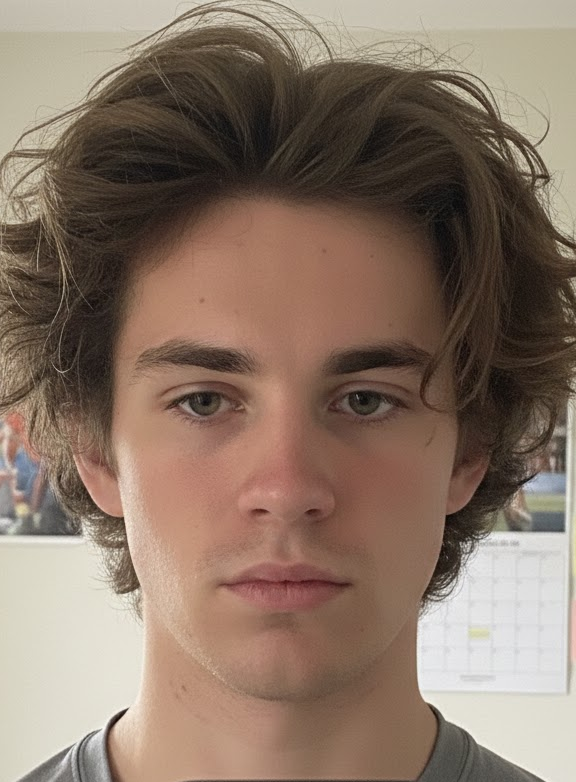
This is an example of a good selfie - clear face, good lighting, looking at the camera
Common Causes and Solutions:
- Face not clearly visible: Make sure your face is the main focus of the image and clearly visible. Avoid photos where your face is partially obscured by hands, objects, or shadows.
- Poor lighting: Use good lighting - natural light works best. Avoid backlit photos or images where your face is in shadow.
- Too far away or too close: Your face should be clearly visible but not take up the entire frame. A good selfie shows your face and upper shoulders.
- Heavy filters or editing: Avoid using heavily filtered or edited images. Our AI works best with original, unedited photos.
- Multiple edits: Important: Avoid using already edited images. Multiple changes and edits can lead to malformations and artifacts that may cause our system to not recognize you in the image. Use original, unedited photos for best results.
- Sunglasses or face coverings: Remove sunglasses, masks, or any accessories that cover your face.
- Blurry image: Make sure your photo is in focus and not blurry.
Image Upload Issues
File Size Too Large
If your image is larger than 30MB, you'll need to compress it before uploading.
- Use an image compression tool online
- Resize the image to a smaller resolution
- Convert to JPEG format (usually smaller file size)
Unsupported File Format
We support the following formats:
- JPEG / JPG
- PNG
- GIF
- WebP
- HEIF / HEIC
If your file is in a different format, convert it to one of the supported formats before uploading.
Email Not Received
If you haven't received your headshot via email:
- Check your spam/junk folder: Sometimes emails can end up in spam folders
- Verify your email address: Make sure you entered your email correctly
- Wait a few minutes: Processing can take a few minutes, especially during peak times
- Check your email provider: Some email providers may block automated emails
- Contact support: If you still haven't received your email after 30 minutes, contact us at linkedheadshot@kreatiu.cat with your selfie UUID
Processing Takes Too Long
If your image is taking longer than expected to process:
- Normal processing time: Most images are processed within 2-5 minutes
- Peak times: During high traffic periods, processing may take up to 10-15 minutes
- Large images: Very large images may take longer to process
- If it's been more than 30 minutes: Contact support with your selfie UUID for assistance
Payment Issues
Payment Not Processing
- Check that your payment method is valid and has sufficient funds
- Verify your billing address matches your payment method
- Try a different payment method if available
- Clear your browser cache and cookies, then try again
- Contact your bank or credit card company to ensure the transaction isn't being blocked
Payment Successful But No Access
If your payment was successful but you haven't received access:
- Check your email for the confirmation and download link
- Wait a few minutes for the system to process your payment
- Contact support with your payment confirmation number
Browser Compatibility
For the best experience, we recommend using:
- Google Chrome (latest version)
- Mozilla Firefox (latest version)
- Safari (latest version)
- Microsoft Edge (latest version)
If you're experiencing issues, try:
- Updating your browser to the latest version
- Clearing your browser cache and cookies
- Disabling browser extensions that might interfere
- Using a different browser
Still Need Help?
If you've tried the solutions above and are still experiencing issues, please contact our support team:
- Email: linkedheadshot@kreatiu.cat
- Alternative Email: aroma@kreatiu.cat
When contacting support, please include your selfie UUID (if applicable) and a description of the issue you're experiencing.